
Textual 7 release notes
The complete recorded changes for Textual 7, grouped by release without losing individual fixes.
On this page
These are the original Codeux release records; references to future plans, support and availability describe the release at the time.
Release Notes for Version 7.2.7
The following list is a summary of all major additions, changes, and fixes part of version 7.2.7 of the Textual IRC Client.
Fixes
- Fixed automatic scrolling on macOS 27.
Release Notes for Version 7.2.6
The following list is a summary of all major additions, changes, and fixes part of version 7.2.6 of the Textual IRC Client.
Changes
- Updated model list for the sysinfo command.
Fixes
-
Fixed inability to select certificates for identification in Server Properties.
-
Fixed find prompt only having a “Cancel” button.
Release Notes for Version 7.2.5
The following list is a summary of all major additions, changes, and fixes part of version 7.2.5 of the Textual IRC Client.
Fixes
-
Fixed notifications not appearing on newer versions of macOS.
-
Fixed a crash caused by the help information of the timer command.
Release Notes for Version 7.2.4
The following list is a summary of all major additions, changes, and fixes part of version 7.2.4 of the Textual IRC Client.
Transition to Sandbox
Textual is now sandboxed. Sandboxing an app isolates it from the rest of your Mac so that damage is limited in the event of a security breach. Great effort has been made to ensure that the transition to a sandbox occurs as seamlessly as possible. If you launch Textual to find your preferences missing, they are not. You can revert to the previous version. Please report any issues that you may encounter.
Changes
-
Rendering channel content has been moved to separate processes, through the use of WebKit2.
-
The Caffeine plugin, which was previously bundled with Textual as an optional install, is now loaded at all times. It no longer requires separate installation.
Fixes
-
Fixed two PONG commands being sent in response to a receiving a single PING command.
-
Fixed “View Logs” menu item not working after a channel has been inactive for some time.
-
Fixed Textual crashing when a WebKit2 process crashes.
-
Fixed inline media not embedding when WebKit2 is enabled.
Plugin Compatibility
All plugins built for version 7.2.3 will not work with version 7.2.4 without updating.
There was a large chunk of legacy, deprecated code in Textual which plugins had been discouraged from accessing. This code has since been deleted to reduce technical debt. As there is no way to guarantee 3rd-party plugins did not access this chunk of the codebase, each plugin must be updated to be compatible with version 7.2.4.
Release Notes for Version 7.2.3
The following list is a summary of all major additions, changes, and fixes part of version 7.2.3 of the Textual IRC Client.
Changes
- Changed uses of “Textual 7” to “Textual”
Fixes
-
Fixed incorrect icon appearing for the App Store in license dialog.
-
Fixed license dialog incorrectly recognizing last generation license keys.
Release Notes for Version 7.2.2
Please note: This release is exclusive to the Standalone Version of Textual available for download on codeux.com. Textual is no longer distributed through the Mac App Store. Learn more
The following list is a summary of all major additions, changes, and fixes part of version 7.2.2 of the Textual IRC Client.
Additions
- Added SHA-512 hash information to the Client Certificate section of Server Properties.
Changes
-
Updated app icon to fit modern macOS aesthetics.
-
Updated model list for the sysinfo command.
-
CPU information is now shown by default when using the sysinfo command on Apple Silicon.
-
All system information commands now accept the argument “quiet” to make the output visible only to you.
-
The sysinfo command no longer offers the preference to ask apple.com for model information. With the transition to randomized serial numbers, this is no longer feasable.
-
The sysinfo command and the screens command no longer output screen refresh rate when it is 60 Hz.
-
System-wide fullscreen settings for automatically hiding the Dock or menu bar are now honored.
-
Textual will no longer prompt to send crash reports after a crash.
Fixes
-
Fixed the selected style turning white after waking from sleep.
-
Fixed a crash that may occur when changing your nickname.
-
Fixed a crash that may occur when deleting a channel.
-
Fixed the np command not working correctly for streamed songs. To update this command, launch the Textual Extras installer using the getscripts command.
Release Notes for Version 7.2.1
The following list is a summary of all major additions, changes, and fixes part of version 7.2.1 of the Textual IRC Client.
Apple Silicon Support
Textual is now distributed as a universal application granting it greater performance and reliability for Apple Silicon Macs.
Fixes
-
Fixed filters not working correctly when a sender is not present in a channel.
-
Fixed user list of previous selection appearing when viewing a parted channel.
-
Fixed a crash that may occur when certificate trust dialog is closed without user interaction.
Release Notes for Version 7.2.0
The following list is a summary of all major additions, changes, and fixes part of version 7.2.0 of the Textual IRC Client.
All-in-one Dark Mode
The styles bundled with Textual have been modernized to change from light to dark and back depending on how your Mac is setup.
The “Main window appearance” preference in the Interface section of Preference can be set to “Your Mac’s Default” to change the appearance of the server list, user list, and style based on changes to your Mac.
Custom Channel Names
A channel can now be assigned a custom label in Channel Properties to take place of its name in the server list.
Additions
- Added M1 Macs to list of models for the sysinfo command.
Changes
-
macOS Sierra (10.12) is now the minimum version of macOS required.
-
Chat filters can now be duplicated by control clicking one that already exists.
-
Chat filters can now be limited based on how long its been since a user joined a channel.
-
Modified list of networks to include Libera Chat.
-
Libera Chat is now the home of the support channel and can be reached through the Help menu.
-
The default maximum nickname length has been changed to 31 characters from 9 characters to accommodate servers that don't advertise a specific limit.
-
Modified the command query to have optional second argument which can be a message to send.
-
Modified the commands amsg and ame no longer increment the unread count of channels.
-
The Preferences window has been enlarged to accommodate system-wide changes on macOS Big Sur.
-
The mechanics that power the User List have been reworked to hopefully provide better reliability.
Fixes
-
Fixed building encryption cache failing because of race condition.
-
Fixed certain actions, such as deleting a channel, not working correctly when popup prompt is suppressed.
-
Fixed duplicates appearing in the member list when configured to show server staff at the top.
-
Fixed malformed div in default style templates.
Release Notes for Version 7.1.7
Please note: This release is exclusive to the Mac App Store as the changes packaged within target features that are not available outside of the store.
The following list is a summary of all major additions, changes, and fixes part of version 7.1.7 of the Textual IRC Client.
Fixes
- Fixed in-app purchases not working correctly by removing them completely.
Release Notes for Version 7.1.6
The following list is a summary of all major additions, changes, and fixes part of version 7.1.6 of the Textual IRC Client.
Fixes
- Fixed hardened runtime blocking the loading of custom extensions and inline media modules.
Release Notes for Version 7.1.5
Please note: This release is exclusive to the Mac App Store as the changes packaged within target features that are not available outside of the store.
The following list is a summary of all major additions, changes, and fixes part of version 7.1.5 of the Textual IRC Client.
Fixes
- Fixed a crash that may occur at launch on versions of macOS prior to 10.13.
Release Notes for Version 7.1.4
The following list is a summary of all major additions, changes, and fixes part of version 7.1.4 of the Textual IRC Client.
Fixes
- Fixed a crash that may occur at launch on versions of macOS prior to 10.13.
Release Notes for Version 7.1.3
The following list is a summary of all major additions, changes, and fixes part of version 7.1.3 of the Textual IRC Client.
Additions
- Added display refresh rate information to the output of the screens and sysinfo commands.
Changes
- Textual is now distributed with hardened runtime enabled to allow for greater security.
-
Growl is no longer supported as a destination for notifications because of incompatibles with hardened runtime.
-
Media hosted by arxius.io and leetfil.es will no longer be shown inline with chat, except when linked directly, due to concerns regarding user privacy.
-
Updated the Blowfish Encryption addon to include the latest version of LibreSSL.
-
Fixes
- Fixed a crash that may occur when entering certain Unicode characters into the main text field.
Release Notes for Version 7.1.2
The following list is a summary of all major additions, changes, and fixes part of version 7.1.2 of the Textual IRC Client.
Styles
Custom CSS rules can now be injected into the active style without copying it.
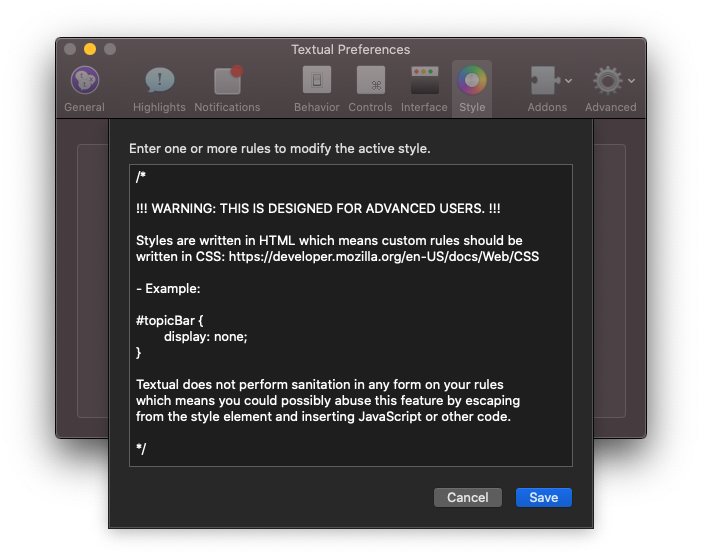
This feature can be accessed by navigating to Preferences ➜ Style ➜ Developers.
Additions
-
Added a version of the np command that is compatible with the Music app bundled with macOS Catalina. To update this command, launch the Textual Extras installer using the getscripts command.
-
Added Catalina to list of operating system names recognized by the sysinfo command.
Changes
-
Improved accuracy and consistency of the model list used by the sysinfo command.
-
“macOS” (without an operating system name) is now displayed when the sysinfo command encounters a version of macOS that it does not recognize.
Fixes
- Fixed trust dialog for invalid certificates not appearing when one is encountered.
Release Notes for Version 7.1.1
The following list is a summary of all major additions, changes, and fixes part of version 7.1.1 of the Textual IRC Client.
Changes
-
The confirmation dialog for quitting Textual no longer appears unless you are connected to IRC. (Thanks William)
-
Any file that is executable will now be treated as a script instead of files with specific extensions. (Thanks Martin)
-
The NICKLEN configuration option of RPL_ISUPPORT is no longer enforced due to significant compatibility issues. (Thanks James)
-
Styles bundled with Textual now declare the
supported-color-schemesproperty to define the appearance of scrollbars on versions of macOS that support it. (Thanks Timothy)
Fixes
- Fixed trust dialog for invalid certificates not appearing when one is encountered.
Release Notes for Version 7.1.0
The following list is a summary of all major additions, changes, and fixes part of version 7.1.0 of the Textual IRC Client.
User Interface
The entire user interface of Textual, from the smallest window to the largest, has been refined to take full advantage of the dark appearance of macOS Mojave.
Additionally, Textual can now be configured to automatically inherit your Mac's appearance to avoid the unnecessary burden of changing it in two places. To do this, change the “Main window appearance” preference in the Interface section of Preferences to “Your Mac's Default”. This is the default for new installations. Existing installations will default to the appearance that was configured before upgrading to macOS Mojave.
Modern Sockets
A new way for apps to establish connections, referred to by Textual as “modern sockets”, is available in macOS Mojave. When conditions are right, Textual will use this to connect to IRC.
Modern sockets can't be configured to prefer IPv4. To accommodate users that want this behavior, the “Prefer IPv4” preference has been replaced with a preference to enable only IPv4, only IPv6, or enable both. Users that had the old preference enabled will be automatically migrated to only IPv4.
See the Network Socket section of Server Properties.
Scrollback Improvements
An indicator, similar to the one shown below, now appears in the scrollback when the day changes.

This indicator can be toggled in the Style section of Preferences.
Additions
-
Added spoiler formatting option which is compatible with other apps.
-
Added support for chghost capability.
-
Added
:thinking:to the Smiley Converter addon. (Thanks Perry) -
Added preference to the Flood Control section of Preferences that can used to add a delay before automatically joining channels. This preference defaults to no delay.
-
Added support for color codes 16 through 98. Click “More…” in the color formatting menu to access these colors.
-
Added inline image support for speedtest.net results.
Changes
-
Tweaked the appearance of the application icon.
-
Errors in Server Properties, Channel Properties, and related windows are now much more descriptive.
-
The command
/cs deopand other variations no longer auto corrects to/cs drop -
Simplified some menus to make them easier to navigate.
-
Log files are now automatically closed after 20 minutes of inactivity.
-
Log files are now automatically closed if there isn't enough space available for them. You will be alerted of this.
-
File transfers are now automatically stopped if there isn't enough space available at the save location.
-
The lagcheck and mylag commands now work regardless of whether automatic Client-to-Client Protocol (CTCP) responses are enabled.
-
The channel quick select window is now detached from the main window. It can be dragged around and will remain on screen until escape is pressed.
-
The following RPL_ISUPPORT configuration options are now correctly handled: AWAYLEN, EXCEPTS, INVEX, KEYLEN, KICKLEN, STATUSMSG, and TOPICLEN.
Fixes
-
Fixed the clearall command not working correctly.
-
Fixed the conn command not working correctly.
-
Fixed running timers not being stopped when disconnected from IRC.
-
Fixed incorrect implementation of RPL_REDIR.
-
Fixed a crash that may occur when using the keyx command.
-
Fixed Preferences window reopening at incorrect location on screen.
-
Fixed some alerts not displaying a “Do not show this again” option when they are supposed to.
Addon Backwards Compatibility
Styles
Styles are no longer permitted to force dark mode.
When a style is loaded that has the Force Invert Sidebars setting enabled, the user will be asked if they want to enable dark mode, instead of forcing it. This behavior is in place for the benefit of the user. To make it easier for them to update preferences to their liking. This behavior should not be relied on by styles to provide a certain experience.
Plugins
Plugin features that were marked as “deprecated” no longer exist.
Release Notes for Version 7.0.10
The following list is a summary of all major additions, changes, and fixes part of version 7.0.10 of the Textual IRC Client.
Additions
-
Added inline video support for public Nest camera clips.
-
Added the setqueryname command which can be used to rename query windows.
-
Added preference to the Inline Media section of Preferences that controls whether video services such as Vimeo, YouTube, and others can be enabled separate of other services.
-
Added “Enable Off-the-Record Messaging” preference to the Off-the-Record Messaging section of Preferences which can be used to disable Off-the-Record Messaging support.
Changes
-
The timer command has been rewritten from scratch. The new command supports repeating timers. It also supports listing, stopping, and restarting timers. Type
/timer helpfor more information. -
The lagcheck and mylag commands now outputs time in milliseconds.
-
The correct syntax for many commands is now shown when a command is used incorrectly.
-
Query windows are no longer renamed during nickname changes if one is already opened for the new nickname.
-
“Begin Session” no longer appears in log files unless at least one message is logged during the session.
-
Support for echo-message has been disabled until message-tags is more widely supported.
-
The per-channel preferences labeled “Show inline media” and “Disable inline media” are now saved internally as separate flags. When the global preference to show media inline with chat is toggled, the per-channel preferences no longer behave as an inverse of the user's intent.
Fixes
-
Fixed the main window segmented controller appearing clipped on the right side.
-
Fixed app becoming unresponsive when displaying certain alerts together.
Release Notes for Version 7.0.9
The following list is a summary of all major additions, changes, and fixes part of version 7.0.9 of the Textual IRC Client.
Additions
- Added support for RPL_REAWAY (597), RPL_GONEAWAY (598), and RPL_NOTAWAY (599).
Changes
-
Away status can now be found next to your nickname in the titlebar of the main window.
-
Commands are now sorted alphabetically when performing tab completion. (Thanks Christopher)
-
Improved performance and reliability of ignores.
-
YouTube videos played inline with chat now support starting at timestamp in link.
-
myip.codeux.com(still served for existing Textual installations) is now used by default for obtaining IP address information during file transfers when all other means have been exhausted. This behavior can be changed in the File Transfer section of Preferences. -
The means by which IP address information is obtained during file transfers can now be changed to use information from the router with no external sources as a fallback. See the File Transfer section of Preferences.
Fixes
-
Fixed a crash that may occur when clicking “View Logs” or “Query Logs”
-
Fixed inability to jump to highlights by double clicking them in the Highlight List window.
-
Fixed inability to reveal new messages when scrolled up when using the style Equinox.
-
Fixed the scrollback going dark when using the style Equinox.
-
Fixed highlight exclusions not working correctly for per-server and per-server highlights.
-
Fixed the “Textual is unable to access the folder that's configured for your log location” alert appearing on screen even when logging is disabled.
Release Notes for Version 7.0.8
The following list is a summary of all major additions, changes, and fixes part of version 7.0.8 of the Textual IRC Client.
Changes
-
Actions in the Total Sublime style are no longer colored red.
-
Improve performance and reliability of the Equinox style.
Fixes
-
Fixed certain Twitch content appearing inline with chat when it wasn't supposed to.
-
Fixed inability to read labels in the server list and user list when dark appearance is enabled.
-
Fixed inability to restore purchases.
Release Notes for Version 7.0.7
The following list is a summary of all major additions, changes, and fixes part of version 7.0.7 of the Textual IRC Client.
Inline Media: New Services
Textual is now capable of showing more than images inline with chat.
Beginning with version 7.0.7, the follow types of media can be inlined:
-
Dailymotion
-
Gfycat
-
Gyazo
-
Imgur .gifv files
-
Liveleak¹
-
Pornhub¹
-
Streamable
-
Twitch Clips
-
Twitch Live
-
Twitter¹
-
Regular image files
-
Regular video files
-
Vimeo
-
xkcd
-
YouTube
¹ Disabled by default
Inline Media: New Preferences
The following preferences have been added to the Advanced section of Preferences:
“Only show images and videos” (disabled by default)
Controls whether to only inline regular image or video files.
“Only inline media that is safe to view in public” (enabled by default)
Controls whether to only inline media that is safe to view in public.
Services that are disabled as a result of this preference includes: Liveleak, Pornhub
“Only inline media from safe sources” (enabled by default)
Controls whether to only inline media that is hosted by safe sources. Safe sources are services that do not inject HTML nor load external JavaScript resources.
Services that are disabled as a result of this preference includes: Twitter
“Load everything” (disabled by default)
Controls whether to load the contents of every link posted to determine which are images or videos.
Additions
- Added the setcolor command to customize the color of a specific nickname.
Changes
-
Nicknames are now assigned a consistent, unique color instead of picking from a pool of thirty possibilities.
-
A “Perform authentication” link is now presented in lieu of a sheet when an Off-the-Record conversation is started with a chat partner that is not recognized.
Fixes
-
Fixed crash that may occur when restoring messages from previous session.
-
Fixed crash that may occur when syncing custom fonts using iCloud syncing.
-
Fixed bug in Blowfish Encryption addon that caused messages not appear in chat.
Backwards Compatibility
Styles
Some custom styles will not work correctly with version 7.0.7 without modification.
To view modifications that need to be made, see this knowledge base article for more information.
Release Notes for Version 7.0.6
The following list is a summary of all major additions, changes, and fixes part of version 7.0.6 of the Textual IRC Client.
Changes
-
Updated the Blowfish Encryption addon to include the latest version of LibreSSL.
-
Updated the Blowfish Encryption addon to hook into a new decryption endpoint.
Fixes
- Fixed Off-the-Record (OTR) Messaging negotiation messages not being ignored when posted outside a query.
Release Notes for Version 7.0.5
The following list is a summary of all major additions, changes, and fixes part of version 7.0.5 of the Textual IRC Client.
Additions
- Added preference to Interface section of Preference to display multiple channels left to right.
Fixes
-
Fixed inability to read or write preferences on macOS High Sierra.¹
-
Fixed trial expired message appearing even after Textual was purchased.¹
¹ These changes only affect the Mac App Store version of Textual.
Release Notes for Version 7.0.4
The following list is a summary of all major additions, changes, and fixes part of version 7.0.4 of the Textual IRC Client.
Additions
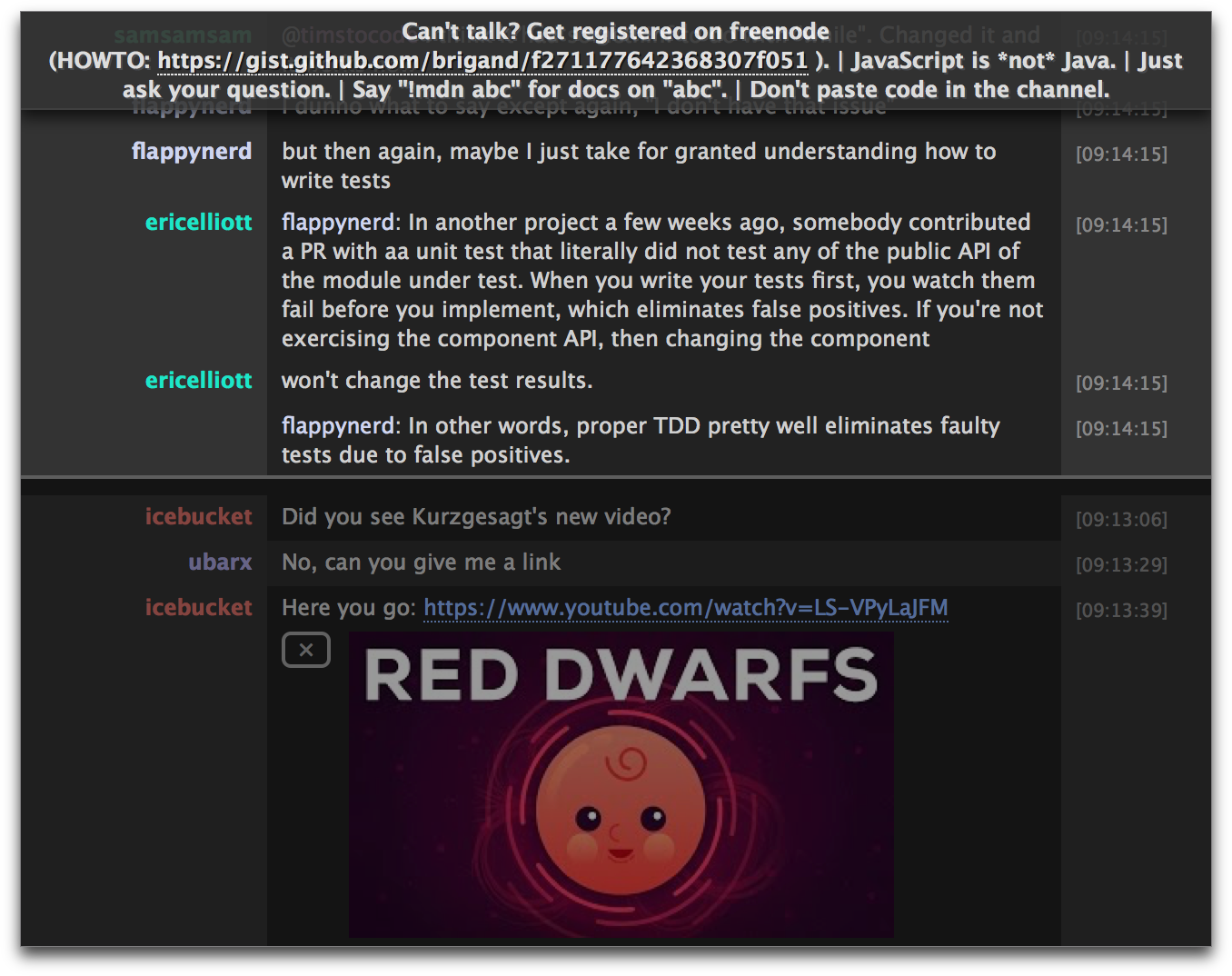
The style “Sulaco” authored by Ryan Grove has been added to the list of default styles.
Here is a preview:
Release Notes for Version 7.0.3
The following list is a summary of all major additions, changes, and fixes part of version 7.0.3 of the Textual IRC Client.
Dynamic Buffer
The new dynamic buffer feature improves memory use by limiting how many messages are visible. While scrolled to the bottom, no more than two hundred messages are visible. More messages can then be revealed by scrolling upward.
By default, Textual will keep a record of 15,000 messages per-channel. This limit can be changed in the Style section of Preferences.
Additions
-
Added a “Current Session” marker to indicate where messages from the previous session end.
-
Added “Jump to Present” action to Navigation menu which can be performed using the keyboard shortcut Control Command B. This action jumps the scrollback to the most recent message.
-
Added “Jump to Current Session” action to Navigation menu which can be assigned a keyboard shortcut. This action jumps the scrollback to the “Current Session” marker.
-
Added “Only play back messages you missed” preference to the ZNC Bouncer section of Server Properties. This preference, which is enabled by default, controls whether the entire playback buffer or only the parts you missed are played back when the playback module is installed.
Changes
-
Textual will now wait for images to be 100% loaded before they are shown inline with chat.
-
Connection names are no longer forced uppercase when Textual is running on OS X Yosemite or later.
-
Connections now gracefully disconnect when your Mac goes to sleep even if the preference “Perform reconnect when waking from sleep” is disabled.
Fixes
-
Fixed scrollbars appearing invisible (plain white).
-
Fixed a crash that may occur when iCloud syncing was enabled.
-
Fixed inability to save trust for a self-signed certificate.
-
Fixed incorrect description for TLS 1.3 cipher suites.
-
Fixed new messages not appearing when received while Textual is hidden or miniaturized.
-
Fixed a lock appearing next to private messages that are not encrypted.
-
Fixed notifications appearing for the ZNC playback buffer when disabled.
Backwards Compatibility
Styles
Some custom styles will not work correctly with the new dynamic buffer feature without modification.
To view modifications that need to be made, see this knowledge base article for more information.
Release Notes for Version 7.0.2
The following list is a summary of all major additions, changes, and fixes part of version 7.0.2 of the Textual IRC Client.
Fixes
- Fixed in-app purchase window not correctly recognizing successful orders.
Release Notes for Version 7.0.1
The following list is a summary of all major additions, changes, and fixes part of version 7.0.1 of the Textual IRC Client.
Additions
-
Added support for sending text formatted with a fixed width (monospace) font.
-
Added support for sending text formatted with any color.
Changes
-
CTCP TIME now responds with the date and time formatted as ISO 8601.
-
CTCP USERINFO now responds with the Real name value of your identity. You can change this value in the Identity section of Server Properties.
Fixes
-
Fixed a crash that may occur when running Textual on OS X Mavericks.
-
Fixed a crash that may occur when clicking the “Frequently Asked Questions” menu item.
Release Notes for Version 7.0.0
There have been several updates since version 7.0.0 which include many exciting changes. See the Release Notes Archive section of the knowledge base for a complete list of changes.
The following list is a summary of all major additions, changes, and fixes part of version 7.0.0 of the Textual IRC Client.
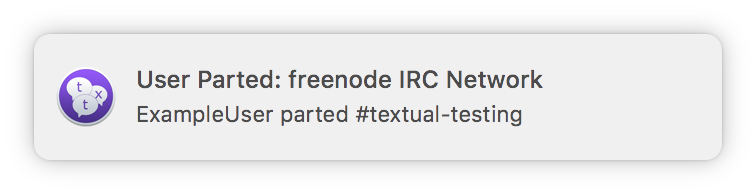
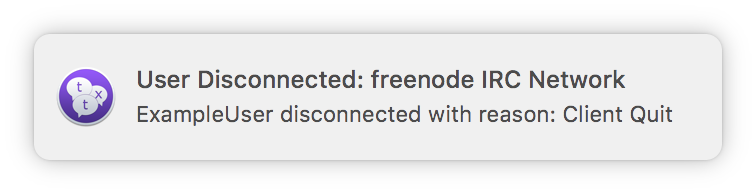
Notifications
Notifications can now be configured for individual channels in Channel Properties.
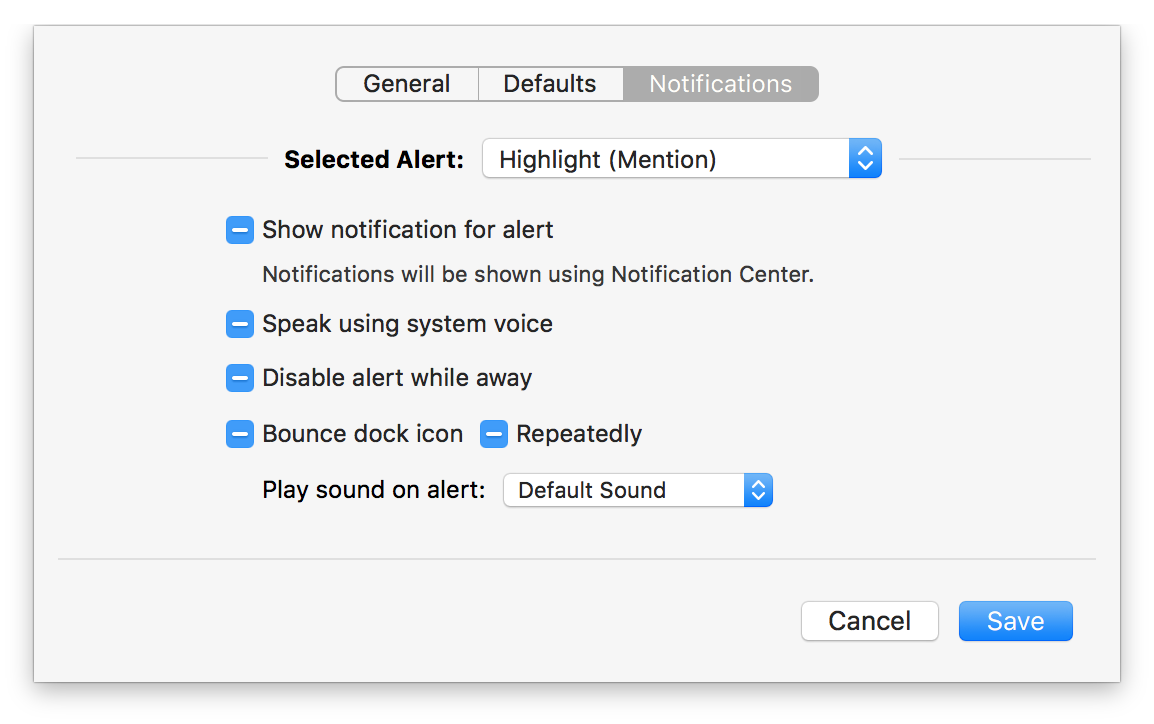
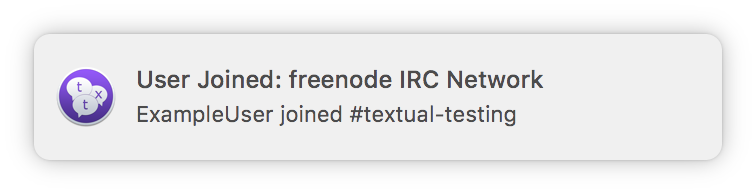
Accompanying this change are three new notification types:
-
User Joined Channel
-
User Parted Channel
-
User Disconnected
Redundancy
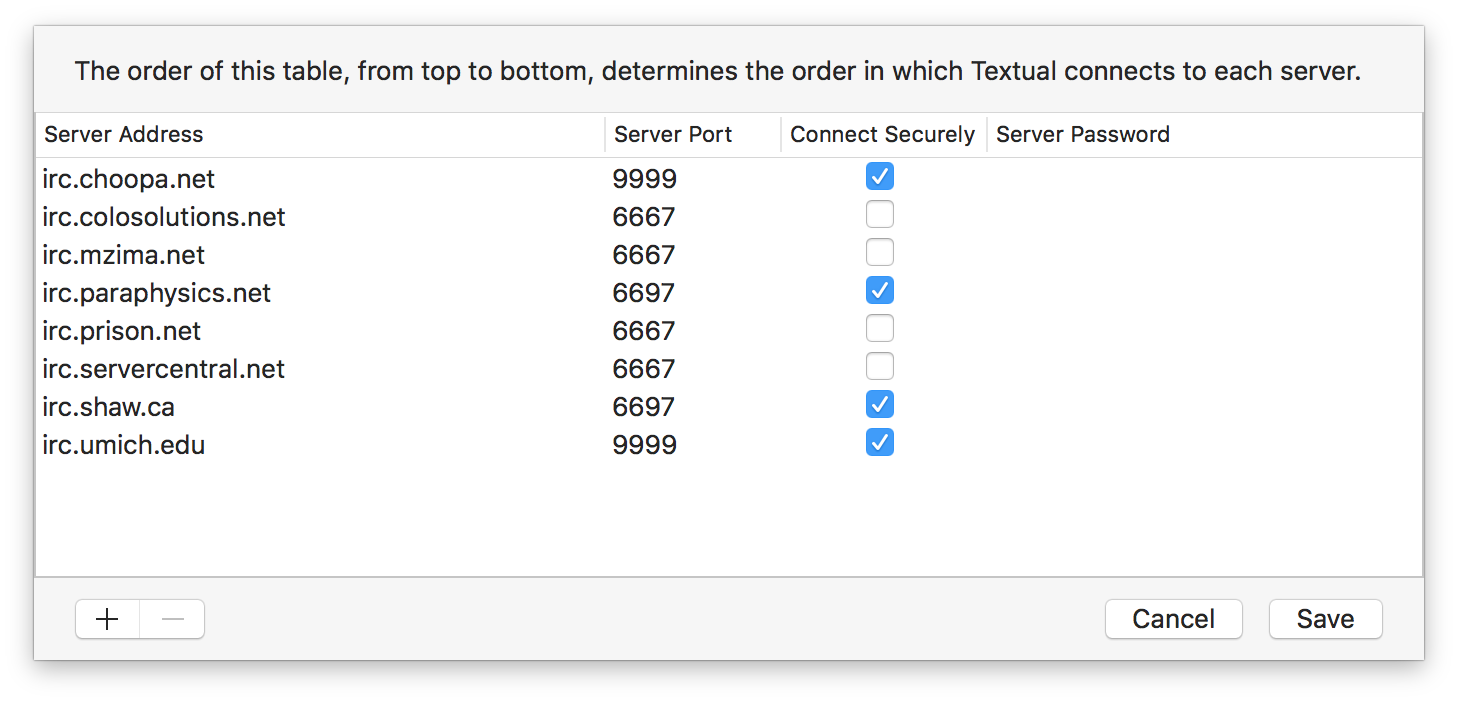
Multiple endpoints can now be configured in the Redundancy section of Server Properties.
Changes
-
Improved compatibility with macOS High Sierra.
-
Highlights can now be copied from the Highlight List window.
-
Improved reliability of playing back messages from previous session.
-
Server list selection is now remembered between app launches.
-
Web pages are now opened in the background when a URL is clicked while holding the Command key.
-
Connections are now hosted by a separate, always sandboxed process to improve performance and security.
-
The sysinfo and screens command now outputs resolution in pixels, instead of points.
-
Updated the Blowfish Encryption addon to include the latest version of LibreSSL.
-
The list of preferred cipher suites has changed. See below for more information.
Changes: Cipher Suites
The cipher suites preferred by Textual have changed to:
| Cipher Suite | Protocol Version |
|---|---|
| TLS_AES_256_GCM_SHA384 | TLS 1.3 |
| TLS_CHACHA20_POLY1305_SHA256 | TLS 1.3 |
| TLS_AES_128_GCM_SHA256 | TLS 1.3 |
| TLS_ECDHE_ECDSA_WITH_AES_256_GCM_SHA384 | TLS 1.2 |
| TLS_ECDHE_RSA_WITH_AES_256_GCM_SHA384 | TLS 1.2 |
| TLS_ECDHE_ECDSA_WITH_AES_128_GCM_SHA256 | TLS 1.2 |
| TLS_ECDHE_RSA_WITH_AES_128_GCM_SHA256 | TLS 1.2 |
| TLS_ECDHE_ECDSA_WITH_AES_256_CBC_SHA384 | TLS 1.2 |
| TLS_ECDHE_RSA_WITH_AES_256_CBC_SHA384 | TLS 1.2 |
| TLS_ECDHE_ECDSA_WITH_AES_128_CBC_SHA256 | TLS 1.2 |
| TLS_ECDHE_RSA_WITH_AES_128_CBC_SHA256 | TLS 1.2 |
The following cipher suites are considered obsolete and will eventually be removed from the app.
| Cipher Suite |
|---|
| TLS_RSA_WITH_AES_128_GCM_SHA256 |
| TLS_RSA_WITH_AES_256_GCM_SHA384 |
| TLS_RSA_WITH_AES_128_CBC_SHA256 |
| TLS_RSA_WITH_AES_256_CBC_SHA256 |
| TLS_RSA_WITH_AES_128_CBC_SHA |
| TLS_RSA_WITH_AES_256_CBC_SHA |
Fixes
-
Fixed a hang that may occur when performing a file transfer.
-
Fixed the back command not working correctly.
-
Fixed users disappearing from the user list.
-
Fixed certain passwords not being removed from keychain when a connection is deleted.
-
Fixed channels not being scrolled to when they are out of view while navigating using keyboard.
Keep reading
Source material
Adapted from the Textual knowledgebase, with related historical details preserved in the legacy library.
- Release-Notes:-Version-7.2.7.kb
- Release-Notes:-Version-7.2.6.kb
- Release-Notes:-Version-7.2.5.kb
- Release-Notes:-Version-7.2.4.kb
- Release-Notes:-Version-7.2.3.kb
- Release-Notes:-Version-7.2.2.kb
- Release-Notes:-Version-7.2.1.kb
- Release-Notes:-Version-7.2.0.kb
- Release-Notes:-Version-7.1.7.kb
- Release-Notes:-Version-7.1.6.kb
- Release-Notes:-Version-7.1.5.kb
- Release-Notes:-Version-7.1.4.kb
- Release-Notes:-Version-7.1.3.kb
- Release-Notes:-Version-7.1.2.kb
- Release-Notes:-Version-7.1.1.kb
- Release-Notes:-Version-7.1.0.kb
- Release-Notes:-Version-7.0.10.kb
- Release-Notes:-Version-7.0.9.kb
- Release-Notes:-Version-7.0.8.kb
- Release-Notes:-Version-7.0.7.kb
- Release-Notes:-Version-7.0.6.kb
- Release-Notes:-Version-7.0.5.kb
- Release-Notes:-Version-7.0.4.kb
- Release-Notes:-Version-7.0.3.kb
- Release-Notes:-Version-7.0.2.kb
- Release-Notes:-Version-7.0.1.kb
- Release-Notes:-Version-7.0.0.kb
- Release-Notes.kb
Need a hand? Contact us about this guide.