
Textual 6 release notes
The complete recorded changes for Textual 6, grouped by release without losing individual fixes.
A reference from an earlier chapter
This material preserves the original Textual documentation and may describe older versions, former services, or superseded policies. It is not a statement of current availability or new Blendbyte commitments.
On this page
These are the original Codeux release records; references to future plans, support and availability describe the release at the time.
Release Notes for Version 6.0.11
The following list is a summary of all major additions, changes, and fixes part of version 6.0.11 of the Textual IRC Client.
Mountain Lion End of Life
Version 6.0.11 is the last version of Textual to support OS X Mountain Lion.
If you recently purchased Textual 6 and use OS X Mountain Lion, then you are eligible for a refund in full.
For assistance requesting a refund, contact the Textual team or use the form located at our contact form.
Fixes
- Fixed a crash that may occur when running Textual on OS X Mountain Lion.
Release Notes for Version 6.0.10
The following list is a summary of all major additions, changes, and fixes part of version 6.0.10 of the Textual IRC Client.
Changes
-
Merged changes made to Equinox style which improves the format of the date displayed when the day changes.
-
Modified the keyboard shortcuts used for text formatting to eliminate collisions with other features. See the Text Formatting knowledge base article to view the new keyboard shortcuts.
-
Modified the frequency of which the “Joining channels has been delayed because you haven't identified.” warning message is displayed and under what conditions.
Fixes
- Fixed some changes to connections not being acknowledged when using iCloud syncing.
Release Notes for Version 6.0.9
The following list is a summary of all major additions, changes, and fixes part of version 6.0.9 of the Textual IRC Client.
Changes
- If the preference “Wait for identification before joining channels” is enabled and a message requesting identification is not received within one minute of connecting, a warning is now displayed.
Fixes
-
Fixed a crash that may occur when the escape key is pressed.
-
Fixed a crash that may occur when syncing a custom style using iCloud.
-
Fixed a CPU spike that may occur when fading in messages from previous session.
-
Fixed dates received from the ZNC bouncer not being parsed correctly depending on locale.
Release Notes for Version 6.0.8
The following list is a summary of all major additions, changes, and fixes part of version 6.0.8 of the Textual IRC Client.
Fixes
- Fixed a crash that may occur when control clicking a user whose address is unknown.
Release Notes for Version 6.0.7
The following list is a summary of all major additions, changes, and fixes part of version 6.0.7 of the Textual IRC Client.
Additions
- Added action “Add Ignore,” “Modify Ignore,” and “Remove Ignore” when control clicking a user.
Changes
- Improved performance of task responsible for removing old messages from playback history.
Fixes
-
Fixed certain keyboard shortcuts not working correctly.
-
Fixed inability to enable the experimental echo-message capability.
-
Fixed inability to enable the update method “Automatically download and install updates”
-
Fixed the clear command not being sent to the playback module of ZNC when closing a query.
Release Notes for Version 6.0.6
The following list is a summary of all major additions, changes, and fixes part of version 6.0.6 of the Textual IRC Client.
Changes
-
Changed automatic scrolling behavior.
-
Messages that are played back from the previous session are now managed by a separate, sandboxed process.
Release Notes for Version 6.0.5
The following list is a summary of all major additions, changes, and fixes part of version 6.0.5 of the Textual IRC Client.
Changes
- Changed automatic scrolling behavior.
Fixes
- Fixed a crash caused by writing to Core Data from multiple threads without a lock.
Release Notes for Version 6.0.4
The following list is a summary of all major additions, changes, and fixes part of version 6.0.4 of the Textual IRC Client.
Additions
-
Added command notifybubble which can be used to display a notification in Notification Center.
-
Added command notifysound which can be used to play a sound effect.
-
Added command notifyspeak which can be used to speak a message using the system voice.
-
Added preference to the Chat Filter addon to limit Filter Action to once every X seconds.
-
Added preference to the Notifications section of Preferences which can be used to exclude channel name and/or nickname from spoken channel messages.
Changes
-
Changed default scrollback limit to 500 messages.
-
Improved reliability of playing back messages from previous session.
Fixes
- Fixed some messages appearing out of order.
Release Notes for Version 6.0.3
The following list is a summary of all major additions, changes, and fixes part of version 6.0.3 of the Textual IRC Client.
Changes
-
WebKit2 is no longer enabled by default.
-
Improved reliability of playing back messages from previous session.
-
Table row colors now alternate when selecting specific channels to apply a filter to.
Fixes
-
Fixed flickering that may occur when using the style “Equinox” (Thanks April)
-
Fixed issue that may cause the incorrect timestamp to be sent to the playback module of ZNC.
-
Fixed the “Automatically handle highlight spam” preference not working correctly.
-
Fixed the “Do not automatically join channels on connect” preference not working correctly.
-
Fixed the ignore command not working correctly.
Release Notes for Version 6.0.2
The following list is a summary of all major additions, changes, and fixes part of version 6.0.2 of the Textual IRC Client.
Additions
- Added inline image support for i.redditmedia.com
Changes
-
Improved reliability of automatic scrolling.
-
The server list will now scroll to any channel navigated to if it is not already visible in the list.
-
Server traffic that is displayed when “/debug raw on” is enabled is now sent to a special utility window. To protect privacy, this utility window does not keep a record of any information shown within.
-
SASL EXTERNAL is now used as the authentication mechanism if a certificate is configured. This behavior can be disabled using the defaults command.
Fixes
-
Fixed duplicates appearing in the user list.
-
Fixed server addresses that contain an underscore being treated as invalid.
-
Fixed many instances in which Textual would hang indefinitely.
-
Fixed the kb command not working correctly.
-
Fixed the moti command not working correctly.
Release Notes for Version 6.0.1
The following list is a summary of all major additions, changes, and fixes part of version 6.0.1 of the Textual IRC Client.
Changes
-
The standalone version of Textual now asks whether it should automatically check for updates.
-
Real names that contain formatting (bold, color, italic, etc.) now appear correctly in the user info popover.
Fixes
-
Fixed a crash that would occur when a loading a custom style that's not compatible with Textual 6.
-
Fixed a crash that would occur when clicking the “Channels” tab in the Edit Filter window.
-
Fixed users in the user list appearing out of order when it is configured to favor IRC operators.
-
Fixed inability to execute certain scripts when a channel is not selected.
-
Fixed mode changes appearing even when general events are disabled.
-
Fixed number of visible messages exceeding the configured scrollback limit.
-
Fixed support for the buffextras module of ZNC.
Release Notes for Version 6.0.0
The following list is a summary of all major additions, changes, and fixes part of version 6.0.0 of the Textual IRC Client.
Performance Improvements
Textual 6 delivers performance unmatched by any of its predecessors when running on OS X El Capitan or later. This is accomplished by laying out and rendering channel content on separate processes using WebKit2.
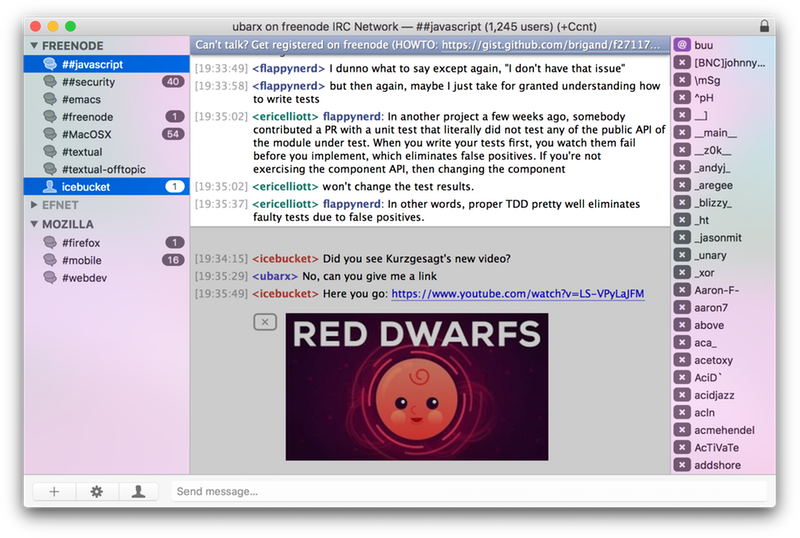
View Multiple Channels
Command click up to six (6) channels to view them simultaneously.
Quick Select
The keyboard shortcut Command D can be used to quickly navigate between channels.*
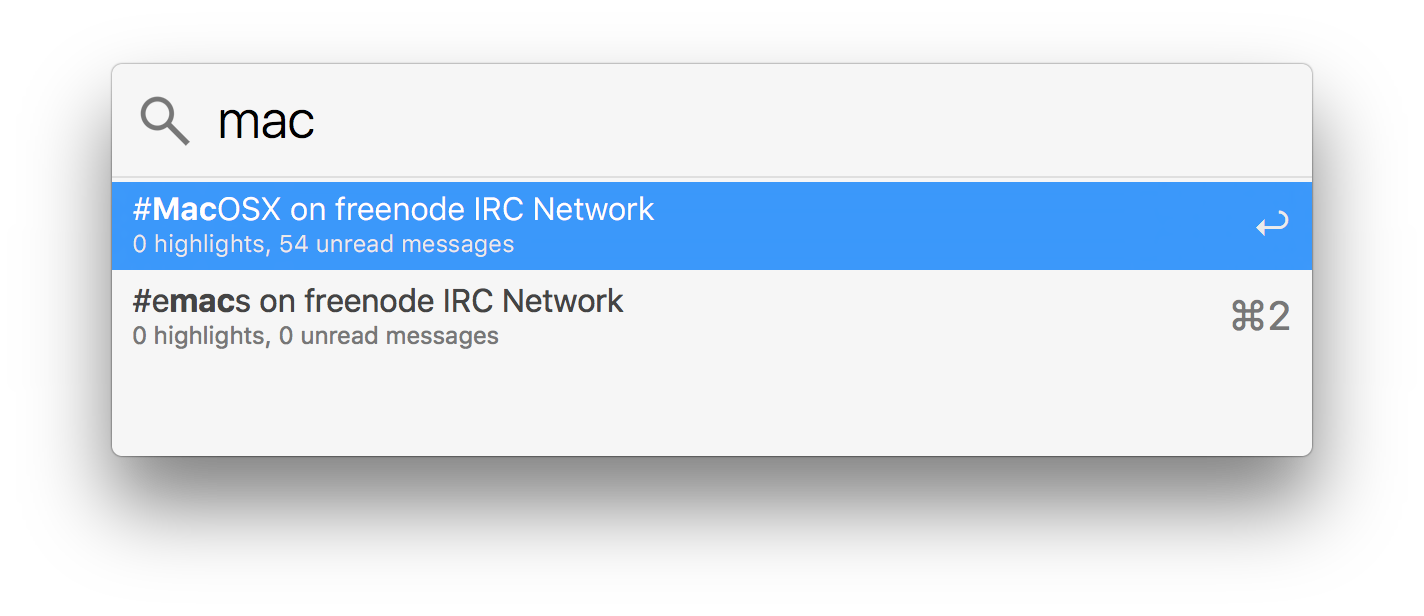
* This feature requires a Mac running OS X Yosemite or later.
Chat Filter Addon
The Chat Filter Addon received a significant overhaul.
Changes
-
An empty Filter Match value will match any possible value.
-
Filters can now be dragged and dropped to change the order they are matched in.
-
Filters can now be exported and imported to allow them to be shared with others.
-
Filters can now respond to more events: user joined channel, user left channel, user kicked from channel, user disconnected, channel topic changed, channel mode changed, and much, much more!
Networking
Textual 6 supports Happy Eyeballs, a protocol for intelligently using IPv6 when available.
A preference to prefer IPv4 has been added to the Network Socket section of Server Properties.
Other Additions
-
Added the command back which can be used to easily toggle off away status.
-
Added the commands quiet and unquiet which can be used to modify the quiet list of the selected channel.
-
Added “List of Quiets” window to view and/or remove entries in the quiet list of the selected channel.
-
Added support for the monitor IRCv3 capability to the Address Book.
-
Added inline image support for .webm files hosted by 4chan and 8chan.
-
Added inline image support for lfil.es short URLs.
-
Added preference “Only speak channel messages for the selected channel”, which is enabled by default.
Other Changes
-
A two second delay now occurs between each join when automatically joining channels. This delay can be modified by navigating to Preferences ➜ Advanced ➜ Flood Control.
-
Textual no longer waits for the Internet to be available before reconnecting when waking from sleep. There is no reliable way to determine when we can truly send data, so it is best to keep trying.
-
It is no longer possible to select more than eight (8) channels at one time in the Channel List window.
-
Incomplete file transfers are now resumed where they stopped when supported.
-
Improved technique for collecting channel information to reduce number of “Max SendQ" disconnects.
-
Improved support for connecting to irssi-proxy.
-
Improved reliability and speed of playing back messages from previous session.
-
The Client Certificate section of Server Properties now includes the SHA-256 fingerprint of the certificate.
-
The commands amsg and ame no longer send messages to queries (private messages).
-
The commands ctcp and ctcpreply now expect the first parameter to always be the destination.
-
The commands gline, gzline, zline, shun, and tempshun no longer modify their input to include the default reason.
-
The commands ignore and unignore are no longer silent. They now provide feedback when performed.
-
When duplicating a connection, its passwords are now duplicated as well.
-
Modified list of whitelisted URL schemes to include “gopher”
-
Modified list of networks to include: GeekShed, MindForge, IdleChat, and LizardIRC.
-
Modified list of networks to remove the now defunct networks: flux.cd, IRCNode, irc.btri.x10.bz, and ValleyNode.
-
Removed inline image support for the now defunct services: img.ly, twitgoo.com, tweetphoto.com, and yfrog.com.
-
Removed the preference to hide messages that mention an ignored user. This preference never worked correctly and had a noticeable impact on performance.
Fixes
-
Fixed inability to add a channel named “#”
-
Fixed almost every misspelling of “Parameter" as “Paramater”
-
Fixed inability to navigate Server Properties using the tab key.
-
Fixed channel passwords not being censored when they are supposed to be.
-
Fixed file transfers failing when sending a file with a name that contains a space.
-
Fixed a bug in the Caffeine addon that caused crashes when deleting connections.
Backwards Compatibility
Filters
All filters added to Textual 5 will work with Textual 6 without modification.
Scripts
All scripts built for Textual 5 will work with Textual 6 without modification.
Styles
Some custom styles built for Textual 5 will not work correctly with Textual 6 without modification.
To view modifications that need to be made, see this knowledge base article for more information.
Plugins
All plugins built for Textual 5 will not work with Textual 6 without modification.
To view modifications that need to be made, see this knowledge base article for more information.
Source material
Original Codeux material preserved from the knowledgebase snapshot of 9 September 2026. Formatting and internal links have been adapted for this site.
- Release-Notes:-Version-6.0.11.kb
- Release-Notes:-Version-6.0.10.kb
- Release-Notes:-Version-6.0.9.kb
- Release-Notes:-Version-6.0.8.kb
- Release-Notes:-Version-6.0.7.kb
- Release-Notes:-Version-6.0.6.kb
- Release-Notes:-Version-6.0.5.kb
- Release-Notes:-Version-6.0.4.kb
- Release-Notes:-Version-6.0.3.kb
- Release-Notes:-Version-6.0.2.kb
- Release-Notes:-Version-6.0.1.kb
- Release-Notes:-Version-6.0.0.kb
Need a hand? Contact us about this guide.