
Migrating Preferences
Historical reference: migrating Preferences.
A reference from an earlier chapter
This material preserves the original Textual documentation and may describe older versions, former services, or superseded policies. It is not a statement of current availability or new Blendbyte commitments.
For current guidance: Preferences, backups, and resetting.
Preference files can be moved from one copy of Textual to another using the following steps:
-
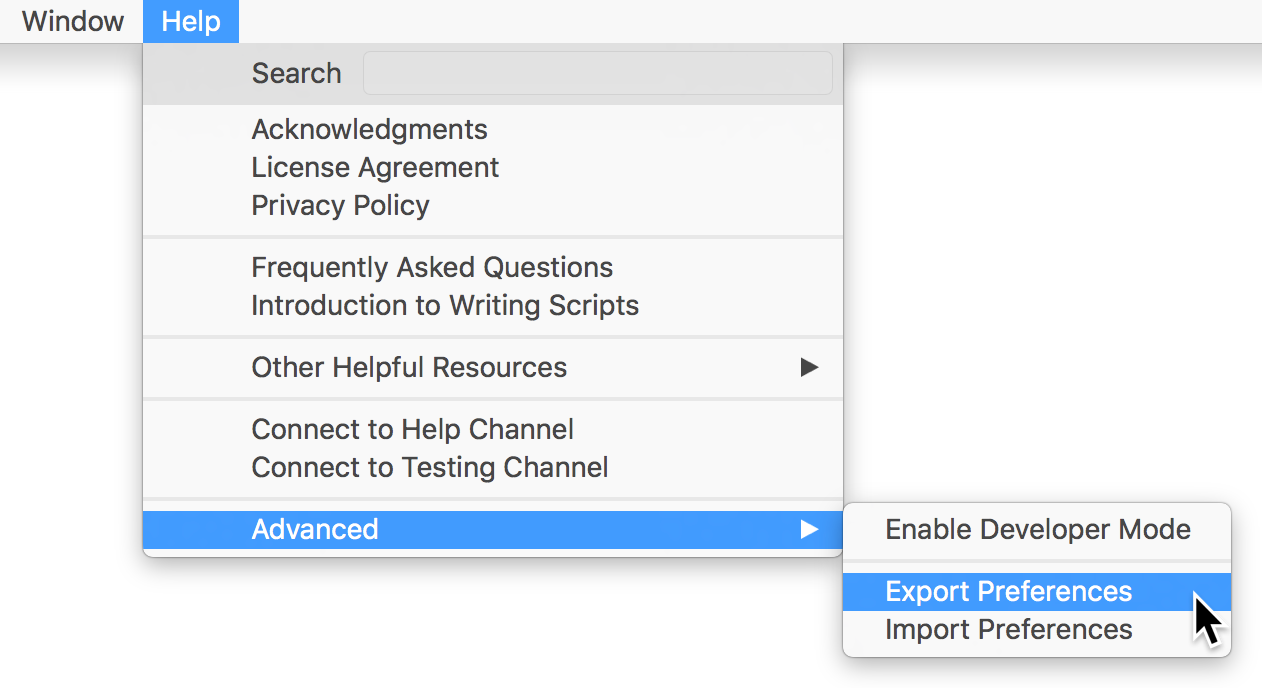
Open Textual's Help menu in the main menu (Command Shift Forward Slash)
-
Move focus to the Advanced section of the Help menu
-
Use the menu items labeled Export Preferences and Import Preferences to migrate preferences
The following image shows the exact location of the menu items described above.
Keep reading
Source material
Original Codeux material preserved from the knowledgebase snapshot of 9 September 2026. Formatting and internal links have been adapted for this site.
Need a hand? Contact us about this guide.