
Styling Textual
Historical reference: styling Textual.
A reference from an earlier chapter
This material preserves the original Textual documentation and may describe older versions, former services, or superseded policies. It is not a statement of current availability or new Blendbyte commitments.
For current guidance: Creating and customizing styles.
On this page
The following is information related to styling Textual.
Introduction
Styling Textual requires a basic understand of client-side web development.
Styles are written in CSS, HTML, and JavaScript. They are rendered using WebKit.
This guide was written to provide an overview of how styles work in Textual. For specific information, such as the name of various CSS selectors that a style can access, use the tools provided by Developer Mode to inspect the raw HTML output that Textual outputs.
Skip to section:
Storage Location
Textual will look at one of two locations to locate custom styles.
A copy of Textual downloaded through the Mac App Store will look at the following path:
~/Library/Group Containers/8482Q6EPL6.com.codeux.irc.textual/Library/Application Support/Textual/Styles/
Otherwise, Textual will look at the following path:
~/Library/Group Containers/com.codeux.apps.textual/Library/Application Support/Textual/Styles/
This path can be easily opened in Finder by bookmarking the following URL: textual://custom-styles-folder
Bundled styles can be copied from the folder:
Textual.app/Contents/Resources/Styles/
This folder is read-only. Attempting to modify it will violate the code signature of Textual.
Developer Mode
“Developer Mode” enables several features which can assist greatly in creating or modifying a style.
To enable Developer Mode, follow these steps:
-
Open Textual's Help menu in the menu bar (Command Shift Forward Slash)
-
Move focus to the Advanced section of the Help menu
-
Locate the menu item labeled Enable Developer Mode. If this menu item does not have a check (✓) next to its name, then it's not enabled. Click it to enable this feature.
The following image shows the exact location of the menu items described above.
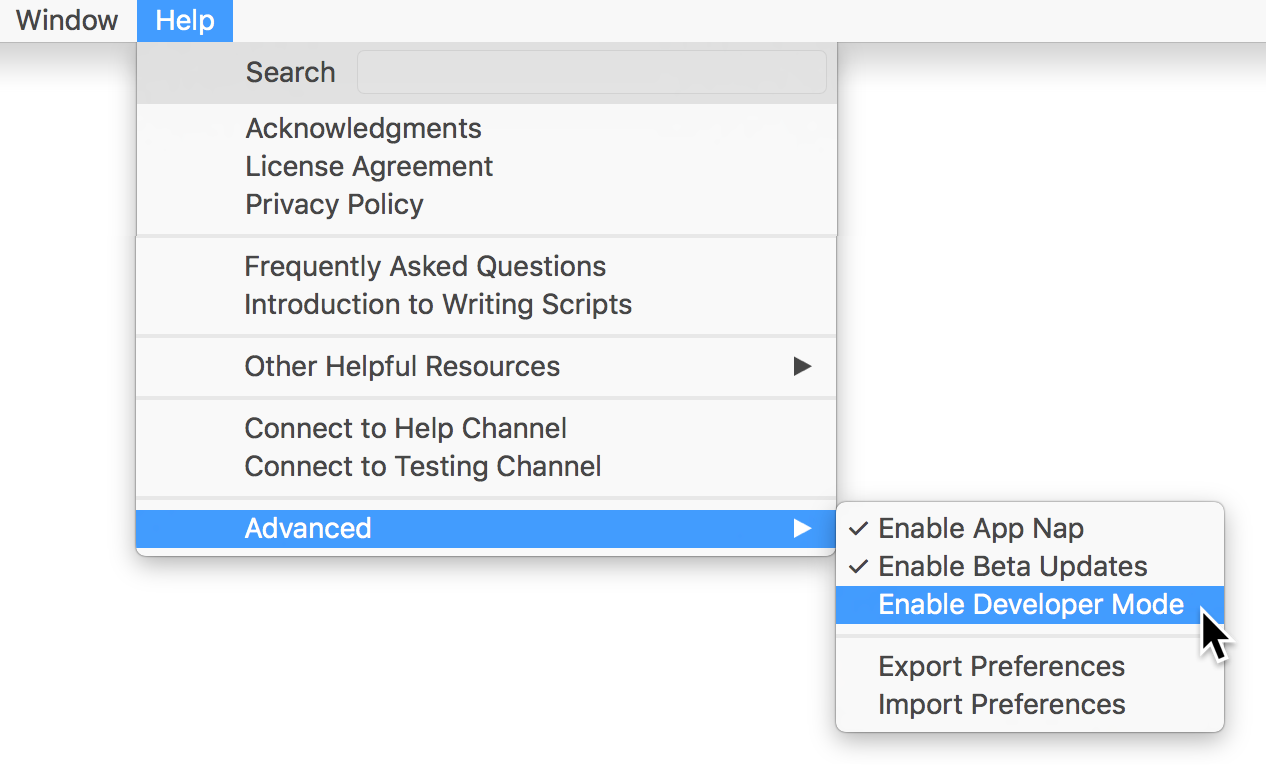
Once enabled, control click on the centered chat view.
Developer Mode provides several new menu items to assist with developing styles including:
-
Copy Log as HTML: Place entire HTML content of the current WebView on the pasteboard
-
Force Reload Style: Force Textual to reload the entire style in all WebViews
-
Inspect Element: Open the WebKit Web Inspector
File Structure
Each style loaded by Textual is encapsulated within its own folder. The name of the folder is used as the title of the style which is visible to the end user in Preferences.
The internal structure of the folder is as follows:
 – copyright.txt
 – Data
    \ – Resources (Custom resources: images, fonts, etc.)
    \ – Documentation (Version information, changes, etc.)
    \ – Templates (Custom templates)
    \ – Settings
         \ – styleSettings.plist
 – design.css
 – scripts.js
copyright.txt
The copyright.txt file is never read by Textual. It is considered the de-facto file for inclusion of any license information that may accompany a style. It can be renamed to any filename that is desired.
design.css — Required
This file is the Cascading Style Sheet (CSS) file that is used by Textual during the loading of each style. While other CSS files can be specified by editing templates (see below); this is generally the only file that is needed for a lightweight style.
scripts.js — Required
The main JavaScript file that is used by Textual when the style is loaded.
JavaScript definitions in this file have access to the global API of Textual. See the file
Textual.app/Contents/Resources/JavaScript/API/core.js for more details.
Templates
See below for more information
styleSettings.plist
A property list of settings that a style can define.
This property list supports the following settings:
| Entry Key | Entry Type | Entry Description |
|---|---|---|
| Nickname Format | String | Override nickname format used by end user |
| Timestamp Format | String | Override timestamp format used by end user |
| Override Channel Font | Dictionary | Override font used by end user. The value of this entry is a dictionary with two keys: Font Name (String) — A system readable font name Font Size (Number) — A font size in pixels |
| Underlying Window Color | String | Window color expressed in HTML hexadecimal notation to blend with background of style during scroll elasticity. |
| Force Invert Sidebars | Boolean | Force dark mode on server and user list |
| Template Engine Versions | Dictionary | See below for more information |
Templates
Textual includes a powerful template engine which means a style can edit any part of the rendered HTML. These templates are opt-in. A style developer does not need to use any of them.
The default templates used by Textual can be found in the following folder:
Textual.app/Contents/Resources/Style Default Templates/Version 3/
Copying the contents of this folder into a style's “Templates” folder will allow that style to override the HTML.
DO NOT copy the entire folder and only modify one file. Only copy and override files that are necessary to the design of a particular style so that future modifications to these default templates will apply.
Template Versioning
The default templates bundled with Textual are designed in such a way that if an update requires it, more than one set can exist at a time. To accomplish this, each set of templates is assigned a number which is considered its version. This information is often referred to as the “template engine version”
Each style must declare what template engine version it supports. If a style does not declare this information, then Textual will warn the end user that the style is incompatible and suggest that they use a different style.
To declare version information, create a new entry in the styleSettings.plist file of a style. Name the new entry “Template Engine Versions” with Dictionary as its data type.
For each entry in the dictionary, the value of the key is the version number of Textual to target (e.g. “5.0.0”). The value associated with the key is the template engine version to target (e.g. “3”).
To help with forward compatibility, an entry can be created with a key named default. The value associated with this key will be used when a specific version of Textual is not targeted.
An example entry is as follows:
	<key>Template Engine Versions</key>
	<dict>
		<key>default</key>
		<integer>3</integer>
	</dict>
Key-value Storage Introduction
Starting with version 5 of Textual, each style has access to a key-value store to maintain various values within. For those unfamiliar with a key-value store, it is a very straightforward concept: Given a unique key, a non-unique value is associated with it which can be retrieved at a later time.
The key-value store is designed to maintain simple values such as style-specific user-configured values. The values maintained within a style's key-value store are saved within the preferences file of Textual. Therefore, trying to abuse the provided API to store large chunks of data can degrade the overall performance of the application.
Enabling Access
The key-value store of a style is opt-in as most will never have a need for it. To opt-in, add a key named Key-value Store Name to the styleSettings.plist file of your style and specify a value. This will be the name used to associate your style with the internal storage mechanism. The name of the style is a good value to use.
Textual does not make an effort to create any sandboxing which means that it is possible that various variants of the same style can access the same key-value store by specifying the same name value.
Data Types
The API provided by Textual is bridged between the public facing JavaScript API and the internal Objective-C storage mechanism. Therefore, type conversion will always occur. In most cases, straightforward conversion will occur such as when dealing with booleans. However, when more complex data structures are assigned, different data types will be used. The following tables provide an incomplete list of the various types of conversion that may occur:
| JavaScript | Objective-C |
|---|---|
| number | NSNumber |
| boolean | CFBoolean |
| string | NSString |
| object | id |
| Objective-C | JavaScript |
|---|---|
| CFBoolean | boolean |
| NSNumber | number |
| NSString | string |
| NSArray | array object |
| WebScriptObject | object |
Key-value Storage Access
app.styleSettingsRetrieveValue(key)
Given key, query the key-value store for its value.
app.styleSettingsSetValue(key, value)
Set key to have value of value within the key-value store.
A value of null or undefined will unset key.
Returns true on success or false otherwise.
Textual.styleSettingDidChange(key)
Callback fired for each view that a style is responsible for to inform it that a particular key-value store entry has changed. This callback receives a single parameter which is the key that changed.
Keep reading
Source material
Original Codeux material preserved from the knowledgebase snapshot of 9 September 2026. Formatting and internal links have been adapted for this site.
Need a hand? Contact us about this guide.