
Complete original command reference
All 107 original command descriptions, including aliases, addon commands and historical integrations.
A reference from an earlier chapter
This material preserves the original Textual documentation and may describe older versions, former services, or superseded policies. It is not a statement of current availability or new Blendbyte commitments.
For current guidance: Working with IRC commands.
On this page
This is the complete former reference, not a list of guaranteed integrations in the current build. Some commands depend on addons, external apps, or network support. Commands can send information to a channel; read the destination and output notes before trying them.
/ame
AME <message>
Sends a message (<message>) to all channels as an action.
This command exists for legacy purposes and is generally discouraged throughout IRC.
Example: /ame is going away!
/amsg
AMSG <message>
Sends a message (<message>) to all channels.
This command exists for legacy purposes and is generally discouraged throughout IRC.
Example: /amsg I will be back later!
/apps
APPS
Outputs a list of applications that are open on your Mac.
The result of this command is sent to the selected channel.
/aquote
AQUOTE <input>
Sends data to all servers without Textual modifying it.
Example: /aquote JOIN #textual
/attach
ATTACH [target]
This command attaches a detached channel when connected to ZNC.
The selected channel is attached if [target] is not specified.
/autojoin
AUTOJOIN
Performs auto join if it has not already been performed.
/back
BACK
Marks you as no longer being away.
This command honors the /away applies to all active connections preference.
/ban
BAN <nickname/hostmask>
Adds <nickname/hostmask> to the ban list of the selected channel.
Example: /ban ExampleUser
Example: /ban *!*@example.com
/banhammer
BANHAMMER
Sends a comedic message to the channel that is selected
/brag
BRAG
Outputs a count of how many channels you are in.
The result of this command is sent to the selected channel.
/cap
CAP
Outputs list of enabled capacities
See http://www.ircv3.org/ for more information
/caps
CAPS
Outputs list of enabled capacities
See http://www.ircv3.org/ for more information
/clear
CLEAR
Clears the scrollback of the selected view
/clearall
CLEARALL
Clears the scrollback of all views
/clones
CLONES
Outputs a list of users in the selected channel that are logged in more than once.
The result of this command is only visible to you.
/close
CLOSE
Leaves the selected channel and removes it from the sidebar.
/conn
CONN [server]
Connects the selected server to [server]
The Server Address configured in Server Properties is connected to if [server] is not specified.
Example: /conn
Example: /conn chat.freenode.net
/ctcp
CTCP <nickname> <command> [extra]
Sends a Client-to-Client (CTCP) request to <nickname> for <command> with optional data.
Example: /ctcp ExampleUser VERSION
Example: /ctcp ExampleUser PING 1375888900
/ctcpreply
CTCPREPLY <nickname> <command> [extra]
Sends a Client-to-Client (CTCP) reply to <nickname> for <command> with optional data.
Example: /ctcpreply ExampleUser VERSION A pretty awesome IRC client!
Example: /ctcpreply ExampleUser PING 1375889081
/cycle
CYCLE
Rejoins the selected channel by leaving it then joining immediately.
/date
DATE
Outputs what time it is in your timezone.
The result of this command is sent to the selected channel.
/debug
DEBUG <message>
Displays a message that is only visible to you.
This command is typically used by scripts to output an error message.
Example: /debug Only I will see this.
/defaults
DEFAULTS <enable | disable> [-a] <feature>
The defaults command can be used to toggle features which cannot be accessed through the user interface of Textual.
List of Features
| Feature | Description | Minimum Version |
|---|---|---|
| Send Authentication Requests to UserServ | Authentication request replies are sent to UserServ, instead of NickServ, when a request is received. | 4.1.3 |
| Disable Automatic SASL EXTERNAL Response | Disable Textual using SASL EXTERNAL as its authentication mechanism when a certificate is configured. | 6.0.2 |
How to Toggle a Feature
Take the name of a feature, surround it with double quote ("), then pass it to the defaults command. The feature will then be toggled for the selected server, or the -a flag can proceed <feature> to toggle it for all servers.
Examples:
Enables feature on selected server:
	/defaults enable "Send Authentication Requests to UserServ"

Disables feature on all servers:
	/defaults disable -a "Send Authentication Requests to UserServ"
/dehalfop
DEHALFOP <nickname>
Takes away half-op (+h) from <nickname> in the selected channel if the server supports this mode.
Example: /dehalfop ExampleUser
/delkey
DELKEY
Unsets the key used by the selected view to perform encryption.
/deop
DEOP <nickname>
Takes away operator (+o) from <nickname> in the selected channel if the server supports this mode.
Example: /deop ExampleUser
/detach
DETACH [target]
This command detaches a channel when connected to ZNC.
The selected channel is detached if [target] is not specified.
/devoice
DEVOICE <nickname>
Takes away voice (+v) from <nickname> in the selected channel if the server supports this mode.
Example: /devoice ExampleUser
/diskspace
DISKSPACE
Outputs the name and size of each disk attached to your Mac.
The result of this command is sent to the selected channel.
/echo
ECHO <message>
Displays a message that is only visible to you.
This command is typically used by scripts to output an error message.
Example: /echo Only I will see this.
/ffuu
FFUU
Sends a comedic message to the channel that is selected
/finduser
FINDUSER [needle]
Outputs a list of users in the selected channel whose hostmask contain [needle]
The hostmask of every user in the selected channel is returned if [needle] is not specified.
The result of this command is only visible to you.
Example Return Value:
[16:00:12] 3 user(s) found in #reddit with a cached hostmask containing the search string “jo”
[16:00:12] buttscicles -> buttscicles!joe@user/buttscicles
[16:00:12] jimjohnson -> jimjohnson!sid28048@user/jimjohnson
[16:00:12] jotun -> jotun!jotun@snoonet/admin/jotun
/flip
FLIP <message>
Flips <message> upside down
The result of this command is sent to the selected channel.
Example: Textual becomes ʃɐnʇxǝʇ
/goto
GOTO <needle>
Navigates to the channel whose name best matches <needle>
This command uses Levenshtein distance to determine the best match for <needle>.
Example: /goto text to navigate to the channel named #textual
/halfop
HALFOP <nickname>
Gives <nickname> half-op (+h) in the selected channel if the server supports this mode.
Example: /halfop ExampleUser
/hermes
HERMES
Outputs the song being played by Hermes
The result of this command is sent to the selected channel.
/hop
HOP
Rejoins the selected channel by leaving it then joining immediately.
/ignore
IGNORE [nickname]
Adds an ignore
Example: /ignore
Example: /ignore ExampleUser
/instacast
INSTACAST
Outputs the podcast being played by Instacast (original website unavailable)
The result of this command is sent to the selected channel.
/j
J <channel[,channel]]> [key[,key]]
Joins channel(s) with optional key(s)
Example: /j #textual
Example: /j #textual superSecretKey
Example: /j #textual,#textual-offtopic superSecretKey,otherSecretKey
/join
JOIN <channel[,channel]]> [key[,key]]
Joins channel(s) with optional key(s)
Example: /join #textual
Example: /join #textual superSecretKey
Example: /join #textual,#textual-offtopic superSecretKey,otherSecretKey
/kb
KB <nickname> [comment]
Kicks and bans user with optional kick message
The default kick message, which can be configured in the Channel Management section of Preferences, is used if [comment] is not specified.
Example: /kb ExampleUser
Example: /kb ExampleUser You are not wanted here!
/key
KEY
Outputs the key used by the selected view to perform encryption.
The result of this command is only visible to you.
/keyx
KEYX [nocbc]
Performs a Diffie–Hellman key exchange to set the key used by the selected view to perform encryption.
The keyx command uses the Cipher Block Chaining (CBC) mode of operation by default. You can instruct the keyx command not to use this mode of operation by passing the nocbc parameter to it.
Example: /keyx
Example: /keyx nocbc
Warning: Keys are limited to 56 bytes (448 bits) and are automatically truncated if they exceed this length. This is a limitation of the Blowfish block cipher and is not an arbitrary limit built into the Blowfish Encryption addon.
Warning: This command uses the Blowfish block cipher and a weak mode of operation to perform encryption. There are much stronger solutions that are available, such as Off-the-Record Messaging (OTR), that you can use.
/kickban
KICKBAN <nickname> [comment]
Kick and ban user with optional kick message
The default kick message, which can be configured in the Channel Management section of Preferences, is used if [comment] is not specified.
Example: /kickban ExampleUser
Example: /kickban ExampleUser You are not wanted here!
/lagcheck
LAGCHECK
Calculates the latency between Textual and selected server.
The result of this command is only visible to you.
/leave
LEAVE [channel[,channel]] [reason]
Leaves channel(s) with optional reason
This command does not remove the channel from the sidebar.
Example: /leave #textual
Example: /leave #textual Talk to you later!
/m
M <channel> [flags] [arguments]
Sets mode(s) on [channel] or retrieves those that are set.
The modes that are available will vary from server to server.
Example: /mode #textual
Example: /mode #textual +mint
/me
ME <message>
Sends a message (<message>) to the selected channel as an action.
Example: /me is tired of writing documentation.
/memory
MEMORY
Outputs how much memory Textual is using.
The result of this command is sent to the selected channel.
/mode
MODE <channel> [flags] [arguments]
Sets mode(s) on [channel] or retrieve those that are set.
The modes that are available will vary from server to server.
Example: /mode #textual
Example: /mode #textual +mint
/moti
MOTI [token]
Sends various emoticons to the channel that is selected.
Possible [token] values:
| Token | Result |
|---|---|
| angel | ☜(⌒▽⌒)☞ |
| angry | ಠ╭╮ಠ |
| angry2 | ಥ_ಥ |
| angry3 | ಠ_ಠ |
| cheers | (^^)o自自o(^^ ) CHEERS! |
| cheers2 | (^^)o自自o(^^ ) KANPAI! |
| darude | ┗(-- )┓┗(--)┛┏( --)┛ ┗(-- )┓┗(--)┛┏( --)┛ |
| doit | (☞゚ヮ゚)☞ |
| doitrev | ☜(゚ヮ゚☜) |
| doit2 | (☞゚ヮ゚)☞ DO IT! |
| dongers | ヽ༼ຈل͜ຈ༽ノ raise your dongers ヽ༼ຈل͜ຈ༽ノ |
| finger | (◕_◕)┌∩┐ |
| fistu | し(*・∀・)/♡\(・∀・*) BRO FISTU |
| frown | (◕︵◕) |
| fusro | (╯°O°)╯FUS RO DAH! |
| gary | ᕕ( ᐛ )ᕗ |
| give | ༼ つ ◕_◕ ༽つ GIVE HUGS |
| glare | Ò_Ó |
| happy | {◕ ◡ ◕} |
| happy2 | ^ㅂ^ |
| happy3 | ^_^ |
| hug | (>^^)> <(^^<) |
| idc | ( ´_ゝ`) |
| kira | (ノゝ∀・)~キラッ☆ |
| leface | ( ͡° ͜ʖ ͡°) |
| love | (。♥‿♥。) |
| nonowa | のヮの |
| orly | d[ ๏ _ ◉ ]b |
| orly2 | d[ ๏ _ ◉ ]b O RLY? |
| panic | ╱o╲ |
| ridic | (╯°□°)╯︵ ┻━┻ THIS IS RIDICULOUS |
| shock | ◉_◉ |
| shock2 | Σ(゚Д゚) |
| shrug | ┐('~`)┌ |
| shrug2 | ┐('~`;)┌ |
| shrug3 | ¯\\(ツ)/¯ |
| smile | (•‿•) |
| smile2 | (。◕‿◕。) |
| sorry | m( _ _ )m |
| sorry2 | m( _ _ )m GOMEN KUDASAI. |
| tableflip | (╯°□°)╯︵ ┻━┻ |
| wave | <o/ |
| wave2 | .o/ |
| wink | ᕋ꒪⍹꒡ᕈ |
| wink2 | ~_^ |
| yay | º╲˚\\╭ᴖ_ᴖ╮/˚╱º YAY! |
| zzz | ┌[;`||~,]┐ zzZ |
/msg
MSG <target[,target]]> <message>
Sends a message (<message>) to <target>
Example: /msg #textual This is channel message!
Example: /msg ExampleUser This is private message!
/msgcount
MSGCOUNT
Outputs how much data has passed through Textual since it was opened.
The result of this command is sent to the selected channel.
/music
MUSIC
Outputs how many songs you have in your iTunes music library.
The result of this command is sent to the selected channel.
/mute
MUTE
Mutes all notification sounds
This mute is persistent across restarts of Textual.
/mylag
MYLAG
Calculates the latency between Textual and selected server.
The result of this command is sent to the selected channel.
/myversion
MYVERSION
Outputs version information for Textual.
The result of this command is sent to the selected channel.
/netstats
NETSTATS
Outputs how much bandwidth your Internet connection has used.
The result of this command is sent to the selected channel.
/notice
NOTICE <target[,target]]> <message>
Sends a message (<message>) to <target> as a notice.
Example: /notice #textual This is channel notice!
Example: /notice ExampleUser This is private notice!
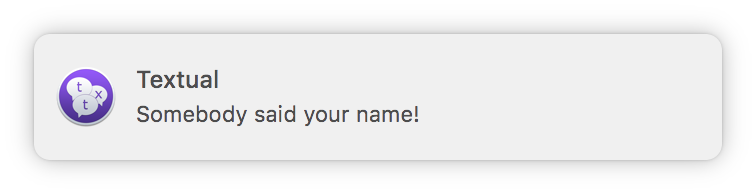
/notifybubble
NOTIFYBUBBLE [target] <message>
Displays a notification which contains <message>
If [target] is a channel name, then that channel will be brought forward when you click the notification.
Note: [target] is selected on the connection that this command is performed on.
Example: /notifybubble Somebody said your name!
Example: /notifybubble #textual Somebody said your name!
/notifysound
NOTIFYSOUND <sound>
Plays the sound effect named <sound>
See the Sound section of System Preferences for a list of sound effects.
Example: /notifysound Glass
Example: /notifysound Submarine
/notifyspeak
NOTIFYSPEAK <message>
Speaks a message (<message>) using the system voice.
<message> is added to a queue when this command is performed. Each message in this queue is played in the order in which it was added. The next message in this queue can be skipped to using the keyboard shortcut Command Period.
Note: Messages placed in this queue are held until all other applications finish speaking.
/np
NP
Outputs the song being played by iTunes
The result of this command is sent to the selected channel.
/o_o
O_O
Sends a comedic message to the channel that is selected
/omsg
OMSG <channel> <message>
Sends a message (<message>) to <channel> that is only visible to operators.
Example: /omsg #textual ExampleUser is a bad person! Ban him!
/onotice
ONOTICE <channel> <message>
Sends a message (<message>) to <channel> as a notice that is only visible to operators.
Example: /onotice #textual ExampleUser is a bad person! Ban him!
/op
OP <nickname>
Gives <nickname> operator (+o) in the selected channel if the server supports this mode.
Example: /op ExampleUser
/page
PAGE
Outputs the URL and title of the frontmost web page open in Google Chrome or Safari.
The result of this command is sent to the selected channel.
/part
PART [channel[,channel]] [reason]
Leaves channel(s) with optional reason
This command does not remove the channel from the sidebar.
Example: /part #textual
Example: /part #textual Talk to you later!
/qt
QT
Outputs the name of file being played by Quicktime
The result of this command is sent to the selected channel.
/query
QUERY <nickname> [message]
Opens a query (also known as a “private message”) with <nickname> and send an optional message.
Example: /query NickServ
Example: /query NickServ help
/quiet
QUIET <nickname/hostmask>
Adds <nickname/hostmask> to the quiet list of the selected channel.
Example: /quiet ExampleUser
Example: /quiet *!*@example.com
/quit
QUIT [reason]
Disconnects from the selected server with optional reason
Example: /quit
Example: /quit Be back later!
/quote
QUOTE <input>
Sends data to the selected server without Textual modifying it.
Example: /quote JOIN #textual
/radium
RADIUM
Outputs the song being played by Radium
The result of this command is sent to the selected channel.
/raw
RAW <input>
Sends data to the selected server without Textual modifying it.
Example: /raw JOIN #textual
/rdio
RDIO
Outputs the song being played by rdio (original website unavailable)
The result of this command is sent to the selected channel.
/rejoin
REJOIN
Rejoins the selected channel by leaving it then joining immediately.
/remove
REMOVE
Leaves the selected channel and removes it from the sidebar.
/reverse
REVERSE <message>
Reverses <message>
The result of this command is sent to the selected channel.
Example: Textual becomes lautxeT
/runcount
RUNCOUNT
Outputs how long it has been since you first began using Textual.
The result of this command is sent to the selected channel.
/screens
SCREENS
Outputs the resolution for each display connected to your Mac.
The result of this command is sent to the selected channel.
/setcolor
SETCOLOR <nickname>
Opens dialog which can be used to change the color of <nickname>
/setkey
SETKEY [key]
Sets the key used by the selected view to perform encryption.
Warning: Keys are limited to 56 bytes (448 bits) and are automatically truncated if they exceed this length. This is a limitation of the Blowfish block cipher and is not an arbitrary limit built into the Blowfish Encryption addon.
Warning: This command uses the Blowfish block cipher and a weak mode of operation to perform encryption. There are much stronger solutions that are available, such as Off-the-Record Messaging (OTR), that you can use.
/setkeymode
SETKEYMODE <mode>
Sets the mode of operation used by the selected view to perform encryption.
Accepted <mode> values:
ecb
Set Electronic Codebook (ECB) as the mode of operation
cbc
Set Cipher Block Chaining (CBC) as the mode of operation
/setqueryname
SETQUERYNAME <nickname>
Rename the selected query to <nickname>
/shell
SHELL <command>
Performs <command> in shell
The result of this command is sent to the selected channel.
WARNING: DO NOT USE THIS COMMAND UNLESS YOU KNOW WHAT YOU ARE DOING
/slap
SLAP <nickname> [item]
Sends a comedic message to the channel that is selected
<nickname> is slapped with a trout if [item] is not specified.
/sme
SME <target> <message>
Sends a secret message (<message>) to <target> as an action.
A “secret” message is a message that is sent without creating a new window.
Example: /sme ExampleUser does not want a new private message opened.
/smsg
SMSG <target> <message>
Sends a secret message (<message>) to <target>.
A “secret” message is a message that is sent without creating a new window.
Example: /smsg TestUser I am sending a message secretly. Shhh!
/spotify
SPOTIFY
Outputs the song being played by Spotify
The result of this command is sent to the selected channel.
/sslcontext
SSLCONTEXT
Opens a dialog which contains the certificate chain for the selected server.
/style
STYLE
Outputs information about the style you are using in Textual.
The result of this command is sent to the selected channel.
/sysinfo
SYSINFO
Outputs information about your model of Mac.
The information output by this command can be configured in the Addons section of Preferences.
The result of this command is sent to the selected channel.
/sysmem
SYSMEM
Outputs how much memory your Mac has and how much of it is being used.
The result of this command is sent to the selected channel.
/t
T <channel> [topic]
Retrieves the topic of [channel] or set [topic] as its topic.
Example: /t #textual
Example: /t #textual This will be the new topic!
/timer
TIMER <arguments>
The timer command can be used to perform a command after a specific amount of time and optionally repeat it.
Adding timer: “/timer <seconds> <repeat> <command>“
<seconds> is the interval of the timer.
The interval must be a whole number that is greater than zero (0).
<repeat> is the repeat count for the timer.
-
To perform the timer only once, use one (1) as the repeat count.
-
To repeat the timer until manually stopped, use zero (0) as the repeat count.
-
To repeat the timer X number of times, use that number as the repeat count.
<command> is the command to perform when the timer fires.
Scope: The channel or query that is selected when a timer is added is used as the target for commands that do not take a channel name as an argument.
Examples:
Perform command one time, after ten seconds:
	/timer 10 1 msg #textual-testing Hey everyone!

Perform command twenty times, once every ten seconds:
	/timer 10 20 msg #textual-testing Hey everyone!

Perform command every ten seconds until the heat death of the universe:
	/timer 10 0 msg #textual-testing Hey everyone!
Removing timer: “/timer remove <identifier>“
Remove the timer assigned to <identifier>.
To remove all timers, pass “all” as <identifier>.
The identifier for a timer can be found using /timer list
Stopping timers: “/timer stop <identifier>“
Stop the timer assigned to <identifier>.
The identifier for a timer can be found using /timer list
Restarting timers: “/timer restart <identifier>“
Restart the timer assigned to <identifier>.
The identifier for a timer can be found using /timer list
When restarting a timer, the iteration count is reset which means a timer that is setup to repeat X number of times will start over from the beginning.
/topic
TOPIC <channel> [topic]
Retrieve the topic of [channel] or set [topic] as its topic.
Example: /topic #textual
Example: /topic #textual This will be the new topic!
/umode
UMODE [flags] [arguments]
Sets mode(s) on self or retrieves those that are set.
The modes that are available will vary from server to server.
Example: /umode
Example: /umode +G
/unban
UNBAN <nickname/hostmask>
Removes <nickname/hostmask> from the ban list of the selected channel.
Using the List of Bans window (Shift Command B) is the recommended way to remove a ban.
Example: /unban TestUser
Example: /unban *!*@example.com
/unignore
UNIGNORE <nickname/hostmask>
Removes an ignore
Using the Address Book (Control-2) is the recommended way to remove an ignore.
Example: /unignore TestUser
Example: /unignore *!*@example.com
/unmute
UNMUTE
Unmute all notification sounds
/unquiet
UNQUIET <nickname/hostmask>
Removes <nickname/hostmask> from the quiet list of the selected channel.
Using the List of Quiets window is the recommended way to remove a quiet.
Example: /unquiet TestUser
Example: /unquiet *!*@example.com
/uptime
UPTIME
Outputs how long your Mac has been powered on.
The result of this command is sent to the selected channel.
/vlc
VLC
Outputs the name of file being played by VLC
The result of this command is sent to the selected channel.
/voice
VOICE <nickname>
Give <nickname> voice (+v) in the selected channel if the server supports this mode.
Example: /voice ExampleUser
Keep reading
Source material
Original Codeux material preserved from the knowledgebase snapshot of 9 September 2026. Formatting and internal links have been adapted for this site.
- Command-Reference.kb
- ame.txt
- amsg.txt
- apps.txt
- aquote.txt
- attach.txt
- autojoin.txt
- back.txt
- ban.txt
- banhammer.txt
- brag.txt
- cap.txt
- caps.txt
- clear.txt
- clearall.txt
- clones.txt
- close.txt
- conn.txt
- ctcp.txt
- ctcpreply.txt
- cycle.txt
- date.txt
- debug.txt
- defaults.txt
- dehalfop.txt
- delkey.txt
- deop.txt
- detach.txt
- devoice.txt
- diskspace.txt
- echo.txt
- ffuu.txt
- finduser.txt
- flip.txt
- goto.txt
- halfop.txt
- hermes.txt
- hop.txt
- ignore.txt
- instacast.txt
- j.txt
- join.txt
- kb.txt
- key.txt
- keyx.txt
- kickban.txt
- lagcheck.txt
- leave.txt
- m.txt
- me.txt
- memory.txt
- mode.txt
- moti.txt
- msg.txt
- msgcount.txt
- music.txt
- mute.txt
- mylag.txt
- myversion.txt
- netstats.txt
- notice.txt
- notifybubble.txt
- notifysound.txt
- notifyspeak.txt
- np.txt
- o_o.txt
- omsg.txt
- onotice.txt
- op.txt
- page.txt
- part.txt
- qt.txt
- query.txt
- quiet.txt
- quit.txt
- quote.txt
- radium.txt
- raw.txt
- rdio.txt
- rejoin.txt
- remove.txt
- reverse.txt
- runcount.txt
- screens.txt
- setcolor.txt
- setkey.txt
- setkeymode.txt
- setqueryname.txt
- shell.txt
- slap.txt
- sme.txt
- smsg.txt
- spotify.txt
- sslcontext.txt
- style.txt
- sysinfo.txt
- sysmem.txt
- t.txt
- timer.txt
- topic.txt
- umode.txt
- unban.txt
- unignore.txt
- unmute.txt
- unquiet.txt
- uptime.txt
- vlc.txt
- voice.txt
Need a hand? Contact us about this guide.